> lsb_release -a
No LSB modules are available.
Distributor ID:	Ubuntu
Description:	Ubuntu 11.10
Release:	11.10
Codename:	oneiric
Tag: env
-
Finding version of Ubuntu via command line
-
Git with vimdiff
Some people are really a big fan of ‘vim’ and so they also use ‘vimdiff’ over the default ‘diff’ utility. ‘vimdiff’ shows you a side by side diff which is very easy to read (shown in the image below).
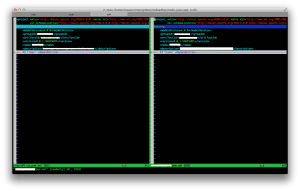
vimdiff in action Now if you are using ‘git’ and you run ‘git diff’ you will get a diff which is not very human readable. Thats where ‘vimdiff’ comes.
> git diff
diff --git a/todo-java-app/pom.xml b/todo-java-app/pom.xml
index 96aebba..6b9af3f 100644
--- a/todo-java-app/pom.xml
+++ b/todo-java-app/pom.xml
@@ -1,5 +1,6 @@

+testing
     4.0.0
     com.rokoder
     todo-java-app
@@ -48,4 +49,4 @@
             5.1.18

-
\ No newline at end of file
+
>
>
‘git’ supports ‘vimdiff’ as a diff tool. Run the below command to change the diff tool to ‘vimdiff’.
(more…) -
Hello World! to Path on Windows
Well working with open source projects on Windows can be painful sometimes. I had faced this issue when I was working Tomcat, JBoss etc. on Windows.
The issue we are talking about is `space` in file names. Lest take one example, JBoss like apps won’t work fine if your Java is installed in `Program Files`. Which generally is the case as the setup you get from Oracle installs it there. People use quick hack to copy the Java folder from there to root dirs, so that there is no `space` in the file path.
Well there is another way to get the short name for a path in Windows. This is neat owes its roots to old 8 char long file names on old machines. Sometimes old legacy saves you in the new world….:)
dir /X
D:\>dir /X
 Volume in drive D is PROG_FILES
 Volume Serial Number is XXXX-XXXX

 Directory of D:\

03/11/2010  09:23 PM    <DIR>                       audio
09/29/2011  10:15 PM    <DIR>          GAMEFI~1     Game Files
03/11/2010  09:30 PM    <DIR>          INTELG~1     intelgraphics
12/17/2011  03:18 PM    <DIR>          PROGRA~1     Program Files
05/20/2011  07:08 PM    <DIR>                       tmp
               0 File(s)              0 bytes
               5 Dir(s)  29,142,163,456 bytes free

D:\>
You can see that `Program Files` have a short name displayed next to it. Now we can use the short name in our environment variables/settings and have our Java installed in `Program Files`. This gives us a benefit as we are going to upgrade Java we don’t have to move it again to the root folder as we would have done if used the traditional approach to get rid of `space`.
